Having all the private-scene people collapsed together in where is nicely compact, but may I suggest the location be changed to ‘Private Scenes’, just to make it look slightly less as though they’re all in just one scene together?
2 Likes
When the event time is across the international date line, things can apparently get confusing:
Dead-Girl is curious- we have an event tonight, right?
+==~==============================~~~~~==+====
All Events1 Gcpd Policeman’s Ball 1932 Fri Nov 22, 2019 4:00pm (10:00pm GMT)
+==~==============================~~~~~==+====Batgirl says, “In a few minutes theoretically”
Dead-Girl says, “okay, cool.”
Dead-Girl says, “I was just making sure, the thing I see is: Sat Nov 23, 2019 12:00am (10:00pm GMT)”
Dead-Girl says, "Which is a bit confusing, because 10PM GMT is not on the 23rd. "
I’m not sure if there’s an easy fix for this (Dead-Girl is in Tel-Aviv, for reference), but I thought I’d point it out. For me, it makes total sense: 4pm CST, 10pm GMT. Cool.
But for someone on the other side of the international dateline, I can see how it’d look like the game clock might be ‘broken.’
I think maybe I’m not following. What do you think it should say? Isn’t 10pm GMT on our Friday gonna be Saturday for someone on the other side of the date line?
At a glance to her, it looked like it was saying ‘10pm GMT on Saturday the 23rd’ - as if the game clock was doing something wonky.
Like I said, I don’t know if there IS a fix/alternative, but it’s something that was mentioned.
Oh hrm. Yeah I’m not sure there really is a great alternative for that (but if someone comes up with one, feel free to holler). I think you just have to trust that the game is showing you the right local time and the server time is just there as a FYI 
It seems like there’s a case where, if the person rolling doesn’t capitalise, the degree of victory line reports the victor as typed.
For example:
<FS3> Hyacinth rolls mental (7 7 6 6 6 6 5 4 3 2 1) vs Reality static (a NPC)'s 5 (6 5 5 3 3 2 2)
<FS3> Crushing Victory for hyacinth.
I think this may only happen on portal rolls, and possibly only the vs ones. I’ve tested some private vs rolls all in lowercase on the client, and they came out correctly.
(Actually, I notice the ability and the second word in that NPC name didn’t get capitalised either, whereas they all would if rolled in the client.)
1 Like
Character details are now shown in the ‘Description’ tab on the web profile. (suggested by Phalkyn)
So, this was implemented in 0.67 and I’m not if it’s working? I haven’t seen it work on any profiles so far anyways. Unless maybe I’m doing something wrong?
1 Like
Hmm… it seems to be working for me? Here’s a character who has a main description and then a detail named ‘dog tags’. Are you trying to set it on your own character?
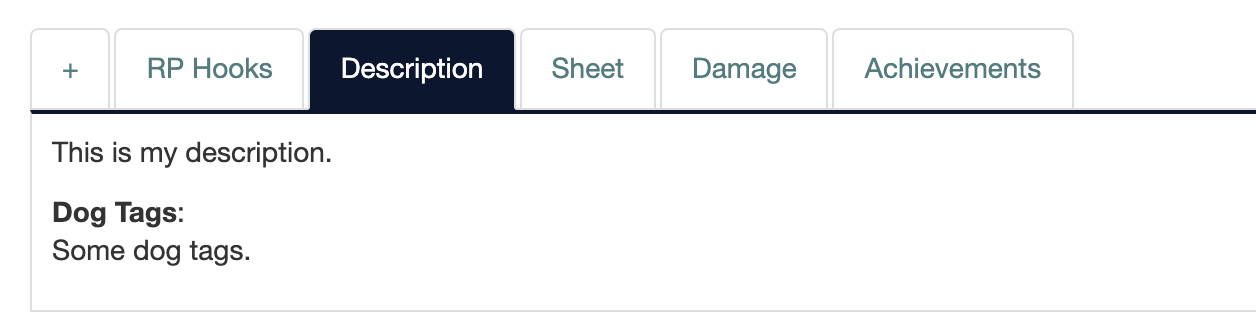
It was GH side. I should have reported it to KB first. They had it fixed in no time. Sorry!
2 Likes
I added “Current Severity” to the damage template on the portal GH. Someone noted that, just looking at the portal, it would seem characters have permanent wounds since they never show as healed, so this might be a thing other games would want.
3 Likes
In other “super tiny things I noticed…”
On profiles on the portal, the titles for Player and Last Online have colons after them, but demographics don’t. On the MUSH, nothing has a colon except the Handle field.
I fixed this on GH. @Ren - You might want to let everyone know who’s using your quote CSS, 'cause now “Quote:” is the only one with a colon after it. 
2 Likes
But everything should have colons! D: Thanks, I’ll adjust that.
Seems that non-admin can use website/deploy.
1 Like
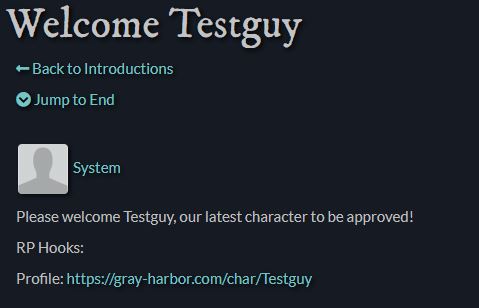
It would be nice if the "Welcome " forum posts on the web linked to the character page so it would be easy to get a closer look. Maybe where it says ‘Please welcome X, our latest’ etc., X could link to the page in question?
2 Likes
@Ren - Just did it on GH. It’s a config setting.
2 Likes
Oh, cool! It’d be a little slicker on the web if it made ‘Testguy’ a link in the first sentence, but I guess that wouldn’t work so well on the client side. I’m glad it’s an available setting; thanks!
I mean you could - you’d just have to do it in Markdown and then in the client side it would show up as Please welcome [Testguy](https://whatever), our latest whatever to be approved.
Since it’s configurable, each game can decide which way they like best.
Got a teeny tiny suggestion, not quite big enough to warrant its own post. Ok if I toss it here? I hope so.
Scenes can be tagged for easier finding of things later, which is awesome. We’ve been debating over in our sandbox if it would be a good idea if these tags were shown – both in the Active scenes list and in the final list of shared scenes?
Not just so that people can search by tag easier but also because it lets you set an Open scene to ‘open with conditions’ by tagging it in the style of #watchonly (for when people can read but you’d prefer for them to not join in), #slowpose (for when people can join in but be warned, there may be hours between poses), or for that matter, #joinusoneandall (for those social scenes where you just want all the people).
2 Likes
Thanks for the suggestion. Some replies below.
#joinusoneandall
I totally understand why some folks would like to do this, so please don’t take this as a criticism or accusation of #WrongFun, but that kinda goes against the whole purpose of “Open” scenes.
The history of why Open scenes exist is rooted in my social anxiety. All my MUSH life, I’d see people RPing in rooms on the public grid, but never know if that scene was really open for joining or not. “Just page and ask” may be easy for some folks, but not for people like me. Especially if they’re strangers (but often even with friends, for fear that they’ll say yes out of some sense of obligation and let me disrupt what they actually wanted to be doing instead.)
So in core Ares, Open inherently means #joinusoneandall, so there’s no need for additional tagging.
#slowpose
SlowPose might be a good candidate for a scene type - like Social/Plot/Vignette/Text. Types do show up on the active scenes page already. You can always change the scene type to something else (social/plot) once the scene is done.
Other games have set a temporary scene title for this purpose. “Chatting at the Coffee Shop (slow work scene)”. This also appears on the active scenes list.
#watchonly
Watchable scenes is something that’s been discussed. Personally I’m not a fan, but I get that other people like it.
@Tat has implemented this as a third privacy setting on Spirit Lake, and has generously contributed instructions for adding it to other games. Unfortunately that has tendrils throughout the scenes code, making it kind of a nightmare to install. And it opens you up to merge conflicts down the road. I’m presently debating whether I want to include that concept in core Ares, either the way Tat implemented it or a different way.
It probably won’t be using tags, though, because those serve a different purpose. They’re intended for wiki organization, to support the automated page lists. So I’m not keen on adding them to the active scenes list, just for ‘information overload’ reasons.
As always though, games are naturally welcome to add a little bit of custom code if they wish to show tags more prominently and/or use them in an expanded way. It would just require some minor tweaks to the web request and template.
1 Like
I think that SlowPose is probably the one that people would have the most use of, yes.
Ah, well. Now it’s tossed out there, and if we figure out how to do it – or someone else does it – then we shall make it happen. Until such a thing happens, scene titles will have to be the answer. Mostly because letting me loose near code will probably start world war III before any politicians manage. 
1 Like