Some people were asking about the /edit feature in Ares. There’s a help file for it! But, I know. I know. Help files.
So, what /edit does is pretty simple. A lot of commands where you set something that’s “permanent”, such as a description? You may want to edit that, and instead of looking at yourself or your room and copy+pasting, you can just do desc/edit me or desc/edit here. Assuming you have it set up right!
Which, this post is designed to help you make sure you have it set up right.
How this works is like such: Your client monitors for a certain pattern in incoming text. When it finds that pattern, it hides the incoming text, and puts the incoming text into you input box. So, if you desc/edit me, you’ll see describe me=<your current description> in your input window. It’s all done client side!
To set this up, if it’s not simply working by default, FIRST… unless you know something special, you should type edit/prefix FugueEdit > into the MU.
Next…
Potato
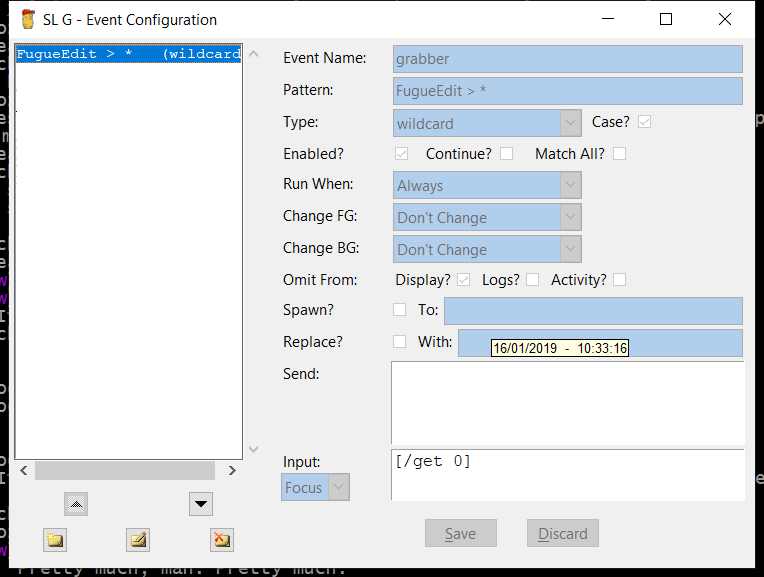
if you have Potato, you need to go to Options → Configure World. You should see, by default, an entry for FugueEdit. If you don’t, add a new event and make it look EXACTLY like this:
Atlantis
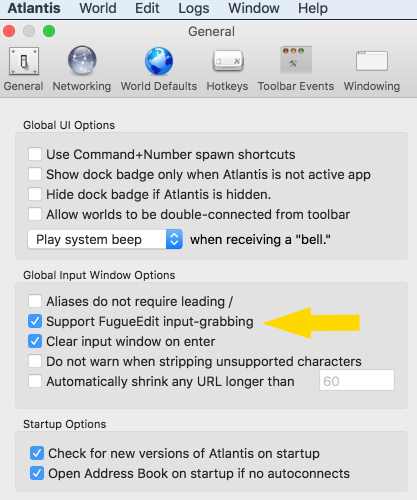
This is even more simple, just do command + , and that’ll open your program settings. Then, make sure you have fugue edit enabled. It’s like this:
Aaaaand… that’s it! type describe/edit me to test it!
If you have another client, idk. Maybe someone else here can help 