I’m attempting to customize the look of the web portal, but every time I try to upload a file (for instance, to replace the current background), I get this error message:
There was a problem connecting to the game. It may be down.
Any thoughts?
Update: This error only appears to happen when I’m trying to work with the hidden admin folder of graphics.
My guess would be you’re hitting the web server’s file size limit. This appears to be a new problem introduced by the API Proxy changes in V0.13.
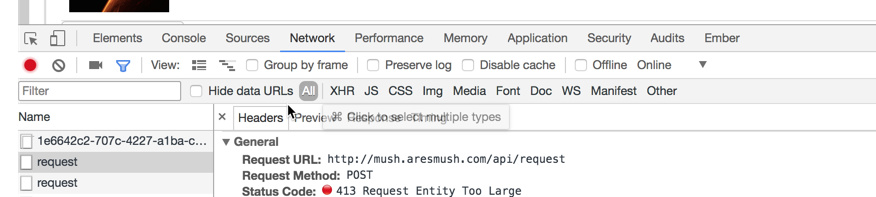
You can confirm this using the browser’s developer tools. For example, in Chrome -
- Open your web portal in a tab.
- Go to View → Developer → Developer Tools.
- Click on the ‘Network’ tab to begin watching network traffic.
- Attempt the upload.
If my theory is correct, you’d see one of the ‘request’ messages in red with a status code of ‘413 Request Entity Too Large’.
I think the default size is only 1MB. You can either make your file smaller, or update the web server’s file size setting to allow bigger files.
If you want to allow bigger files:
- Connect to the server shell and use nano (or your favorite server text editor) to edit the nginx config:
sudo nano /etc/nginx/sites-enabled/default
- In the
server section, add a line for client_max_body_size, like so:
server {
        listen 80 default_server;
        listen [::]:80 default_server;

        root /var/www/html;

        client_max_body_size 100M;
- Save and exit (in nano it’s CTRL->X and say Y to save.)
- Restart your web server:
sudo service nginx restart.
That fixed it for me on BSGU. I will update the default web server config to have a bigger size in the standard install setup.
1 Like
Fixed it up as smooth as silk, thanks!
(And sorry to be a needy newbie.) 
Glad it worked! And don’t be sorry. It was a problem with the web server configuration - nothing you did wrong