I know in many cases things are just put on the wiki. However, for CharGen I have a field where just a simple help file would really do.
I don’t want to chase the on-game CG people off-game to the wiki if they don’t want to since it’s only going to be a paragraph, maybe two in length, but it’s definitely longer than the single sentence that the physique line is in the demographics command ‘help.’
I’ve been going through the setup tutorial pages and I feel like I’m just simply missing something somewhere to add a new help file. There’s got to be other basic use cases like this, right? (And if I am missing it; I understand… I’ve been picking at this off and on all day while sick, so it’d be very easy to miss a thing!)
Adding a help file is considered ‘code’ (the assumption was that normally you’d be creating a new help file for a new coded command), and is covered in the basic coding tutorials. Specifically in the Create a Help File step of the “Adding a Command” tutorial.
Ah-ha!
I had the coding tutorials open, but I hadn’t begun delving into them (due to how late it was). I’d tried a search on the AresMUSH site, but it didn’t turn up anything. Some of the results I got actually 404’d, so I think the Google indexer might need to be kicked.
I hadn’t imagined that adding a help file might be in there (I’m used to other code bases, obvs, where those are somewhat elsewhere).
I mean obvs it’s ‘code’ on, say, MUX, but… just a simple call to a DB.
1 Like
Irk, I just realized that the search engine is fubar-ed since I switched it from http: to https:. Doh. I’ll fix that. Thanks for pointing it out.
I can add a link to the help file editing from the management page too. I just figured it would mostly come up when people were creating new commands, so putting it with the code tutorials made sense at the time.
1 Like
It might not be a bad idea. Due to the nature of some of the demographic fields (and how some already have that ‘see ‘help whatever’’ listed), people might go 'Oh, that’s a good idea. I don’t need a full wiki page just for this one blurb!
Obviously actors is a full help file for a command, but as in my case, I want people to have the option (when CGing on game vs on website) to read just a blurb on the game rather than leaving it.
It may just be a ‘me’ use case, but it might not? I don’t know!
But the search indexing is def. something that would be a huge appreciation for a fix. Thank you! I imagine I’ll be using it a lot. 
Just to make sure I understand … you’re looking for something more than just the built-in help blurb for a demographic field? Like a demographic field that has several paragraphs of help so it warrants its own help file?
If so that’s certainly something that you can do by creating a custom help file. That tutorial should show you how.
Yeah, that tutorial works perfectly.
Because the blurb in the demographics file seems suitable for a single sentence (or two, if short). I’m looking at something likely closer to a paragraph in length.
1 Like
So I’m back. Maybe I should just rename this thread to ‘Ares Tutorial Feedback’?
https://aresmush.com/tutorials/code/edit-code/github-transcript/
Mostly got this one.
Mostly.
Except for one thing.
Unfortunately it’s kind of a big thing.
I mean, you see, I am that person that would generally just edit code on the fly (on the game, whathaveyou), but you know what. I should learn this Github stuff. I’ve had an account forever, I know the basics of it. I even have the Github Desktop. So all of that was fine.
…but how do I tell the game to (git) pull from my fork rather than the master?
1 Like
GitHub will pull from whatever repository you cloned when you set the game up. By default this is the main Ares code, but you can specify your personal fork in the install options.
If you need to add the fork after the game is installed, you’ll need to re-point the GitHub “origin” to your forked repository instead of the main one.
In GitHub desktop:
- Open the repo.
- Go to Repository → Repository Settings → Primary Remote Repository.
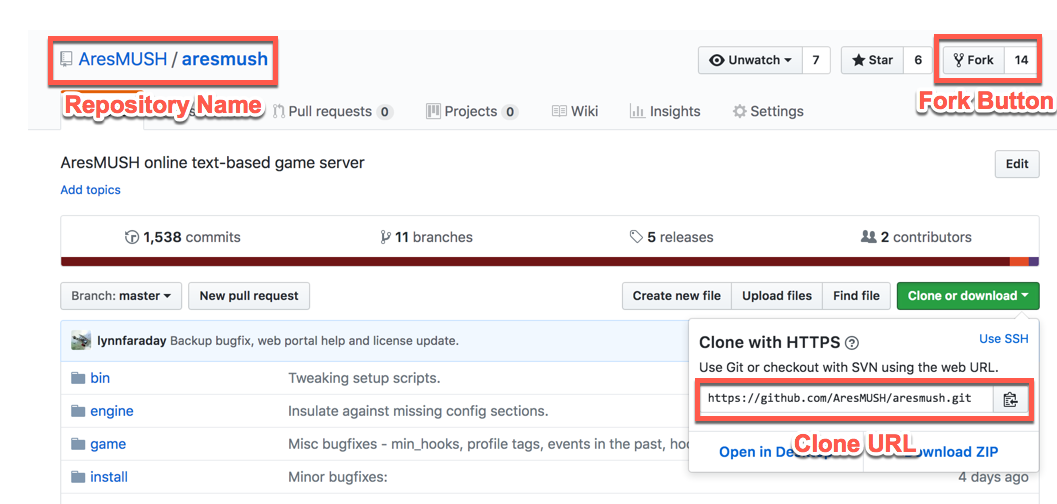
- Enter your fork’s clone URL.
- Repeat for the web portal repo.
In the server shell:
- Go to the aresmush directory.
- Type
git remote set-url origin <Your Clone URL>
- Repeat for the web portal directory.
The clone URL is found here:
Awesome. It was that 2nd part that I needed. 
Thanks!
1 Like